调试端口是在phpinfo()的信息查看的。
必须保证IDE监听的端口与phpinfo()中记录的端口保持一致。

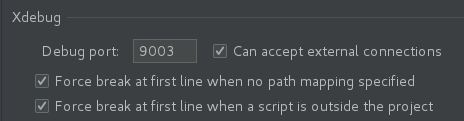
调试端口是在phpinfo()的信息查看的。
必须保证IDE监听的端口与phpinfo()中记录的端口保持一致。
version: '3'

services:
  gitlab:
    image: gitlab/gitlab-ce:11.9.12-ce.0
    restart: always
    container_name: gitlab
    hostname: gitlab.pointsmart.cn
    privileged: true
    user: root
    ports:
      - "80:80"
      - "443:443"
      - "222:22"
    environment:
      GITLAB_OMNIBUS_CONFIG: |
        gitlab_rails['time_zone'] = 'Asia/Shanghai'
        gitlab_rails['gitlab_shell_ssh_port'] = 222
        gitlab_rails['gitlab_shell_git_timeout'] = 800
    volumes:
      - /etc/localtime:/etc/localtime:ro
      - /data/gitlab/config:/etc/gitlab
      - /data/gitlab/logs:/var/log/gitlab
- /data/gitlab/data:/var/opt/gitlabfor i in `docker ps -q`;do docker top $i; done
for i in $(docker ps -q); do docker top $i; done
或
for i in `docker ps |grep Up|awk '{print $1}'`;do docker top $i; doneupstream xaio443 {
server 172.16.0.103:443;
server 172.16.0.104:443;
}
upstream xaio80 {
server 172.16.0.103:80;
server 172.16.0.104:80;
}
log_format proxy '$proxy_protocol_addr $remote_addr [$time_local] '
'$protocol $status $bytes_sent $bytes_received '
'$session_time "$upstream_addr" '
'"$upstream_bytes_sent" "$upstream_bytes_received" "$upstream_connect_time"';
server {
listen 443;
ssl_preread on;
proxy_connect_timeout 1s;
proxy_timeout 3s;
proxy_pass xaio443;
access_log /data/logs/access443.log proxy;
error_log /data/logs/error443.log info;
}
server {
listen 80;
proxy_connect_timeout 1s;
proxy_timeout 3s;
proxy_pass xaio80;
access_log /data/logs/access80.log proxy;
error_log /data/logs/error80.log info;
}#!/bin/bash
path_current=`pwd`
path_script=$(cd "$(dirname "$0")"; pwd)
cd ${path_script}
echo "$(date)" >> ./check.txt
podnamspace="-n test"
shpods=$(kubectl describe pods "sh-" ${podnamspace}|grep "^Name:"|awk '{print $2}')
echo ${shpods}
sh_tm_max=0
for sh in ${shpods[@]}
do
mytime=$(kubectl describe pod ${sh} ${podnamspace}|grep "^Start Time:")&& mytime=$(echo ${mytime:11}) && mytime=$(date -d "$mytime" +%s)
elapse=$(expr ${sh_tm_max} - ${mytime})
if [ $? == 0 ] && [ ${elapse} -lt 0 ]; then
sh_tm_max=${mytime}
fi
done
echo "sh pods start time: $sh_tm_max"
apipods=$(kubectl describe pods "api-" ${podnamspace}|grep "^Name:"|awk '{print $2}')
echo ${apipods}
for api in ${apipods[@]}
do
mytime=$(kubectl describe pod ${api} ${podnamspace}|grep "^Start Time:")&& mytime=$(echo ${mytime:11}) && mytime=$(date -d "$mytime" +%s)
elapse=$(expr ${sh_tm_max} - ${mytime})
howMinute=$(expr $elapse / 60)
output="${api} pod start time: $mytime, ${sh_tm_max} - ${mytime}=[${elapse}s, ${howMinute}m]"
echo "$output" && echo "$output" >> ./check.txt
if [ $? == 0 ] && [ $howMinute -ge 0 ]; then
echo "delete this pod $api"
kubectl delete pod $api ${podnamspace} && echo "success to delete $api" >> ./check.txt
fi
done1、修改虚拟机配置如CPU核数或内存等
virsh edit aiodev
2、启动虚拟机
virsh start aiodev
3、停止虚拟机
virsh stop aiodev
4、显示所有运行的虚拟机
virsh list
5、快照创建
virsh snapshot-create-as aiodev ospure
6、显示快照列表
virsh snapshot-list aiodev
7、快照回滚
virsh snapshot-revert aiodev ospure
apiVersion: extensions/v1beta1
kind: Deployment
metadata:
  name: ccc.cccc.cn
  labels:
    app: web-api
spec:
  replicas: 3
  template:
    metadata:
      labels:
        app: api
    spec:
      restartPolicy: "Always"
      containers:
      - name: api-cccc-cn
        image: api:39
        imagePullPolicy: "IfNotPresent"
        command: ["/bin/sh","-c"," /usr/local/bin/composer dump-autoload ; crontab -e -u www-data ; crond ; /usr/bin/supervisord "]
        resources:
          limits:
            cpu: "1500m"
            memory: "1000Mi"
          requests:
            cpu: "200m"
            memory: "200Mi"
        ports:
        - containerPort: 80
          name: http
          protocol: TCP
        - containerPort: 443
          name: https
          protocol: TCP
        - containerPort: 9913
          name: nginx-vts
          protocol: TCP
        - containerPort: 9190
          name: php-fpm-export
          protocol: TCP
        - containerPort: 42323
          #hostPort: 42323
          name: php
          protocol: TCP
        - containerPort: 8080
          name: tcp-8080
          protocol: TCP
        readinessProbe:
          failureThreshold: 3
          periodSeconds: 5
          successThreshold: 1
          tcpSocket:
            port: 443
        volumeMounts:
        - name: nginx-configmap
          mountPath: /etc/nginx/conf.d
        - name: nginx-configmap-consul
          mountPath: /etc/nginx/sites-enabled
        - name: nginxcert-configmap
          mountPath: /var/www/cert
        - name: api-nginx-log
        #- name: nfs-pvc
          mountPath: /var/log/nginx/
        - name: nfs-php-logs
          mountPath: /var/www/html/k8s/storage/logs/
        - name: api-php-uploads
          mountPath: /var/www/html/k8s/public/uploads
        - name: api-php-vendor
          mountPath: /var/www/html/k8s/vendor/
      imagePullSecrets:
      - name: registry-secret-new
      volumes:
      - name: nginx-configmap
        configMap:
          name: nginxconf-api
      - name: nginx-configmap-consul
        configMap:
          name: nginxconf-consul.cccc.cn
      - name: nginxcert-configmap
        configMap:
          name: nginxcert-cccc.cn
      - name: api-nginx-log
      #- name: nfs-pvc
        hostPath:
      # persistentVolumeClaim:
          path: /data/logs/api-nginx
         # claimName: product-claim-api
      - name: nfs-php-logs
        persistentVolumeClaim:
          claimName: product-claim-api-php-logs
      - name: api-php-uploads
        persistentVolumeClaim:
          claimName: product-claim-api-upload
      - name: api-php-vendor
        persistentVolumeClaim:
          claimName: product-claim-api-vendor
转:
误操作删除服务器上git仓库的处理方法
说明:
git 服务器上仓库代码不小心被删除了,但是通过git clone下来的code存在
另外git 服务器上没有建立任何branch信息;
1.在之前clone过服务器代码的客户端机器上,找到clone下来的代码目录,
执行git remote -vv
查询原来git 仓库所在服务器的IP地址以及路径;
2.根据步骤1上查询的结果,在服务器上找到对应路径,创建git仓库;
git init –bare
3.在客户端之前clone 代码所在目录,强制push客户端的代码至服务器
git push origin master –force
这样原来clone下来的代码以及change log等信息,就会被强制clone到服务器上;
说明:此处必须加–force选项,否则会因服务器上仓库信息与客户端仓库信息不匹配导致push失败
——————————————————
免密模式中的.ssh目录必须是700权限,和authorized_keys必须是600权限
cmake_minimum_required(VERSION 3.14)
project(CommaSdkActivator)

set(CMAKE_CXX_STANDARD 11)


# yum install glibc-static libstdc++-static
set(CMAKE_CXX_FLAGS "${CMAKE_CXX_FLAGS} -static")

if(WIN32)
  set(CMAKE_EXE_LINKER_FLAGS "${CMAKE_EXE_LINKER_FLAGS} /SUBSYSTEM:WINDOWS,5.01")
endif()

if(MSVC)
    # Use the static C library for all build types
    foreach(var
        CMAKE_C_FLAGS CMAKE_C_FLAGS_DEBUG CMAKE_C_FLAGS_RELEASE
        CMAKE_C_FLAGS_MINSIZEREL CMAKE_C_FLAGS_RELWITHDEBINFO
        CMAKE_CXX_FLAGS CMAKE_CXX_FLAGS_DEBUG CMAKE_CXX_FLAGS_RELEASE
        CMAKE_CXX_FLAGS_MINSIZEREL CMAKE_CXX_FLAGS_RELWITHDEBINFO
      )
      if(${var} MATCHES "/MD")
        string(REGEX REPLACE "/MD" "/MT" ${var} "${${var}}")
      endif()
    endforeach()
endif(MSVC)

add_executable(CommaSdkActivator main.cpp)